Text-to-video ads begin with a written brief, not a prompt box. A prompt can produce motion, but an advertisement still needs a defined audience, a credible claim, a recognisable product, and a next step. If those choices are vague, a beautiful generated clip will often be a beautiful clip with no commercial job. This guide turns a campaign brief into a controlled sequence of generated shots, real evidence, edited versions, and measurable results.
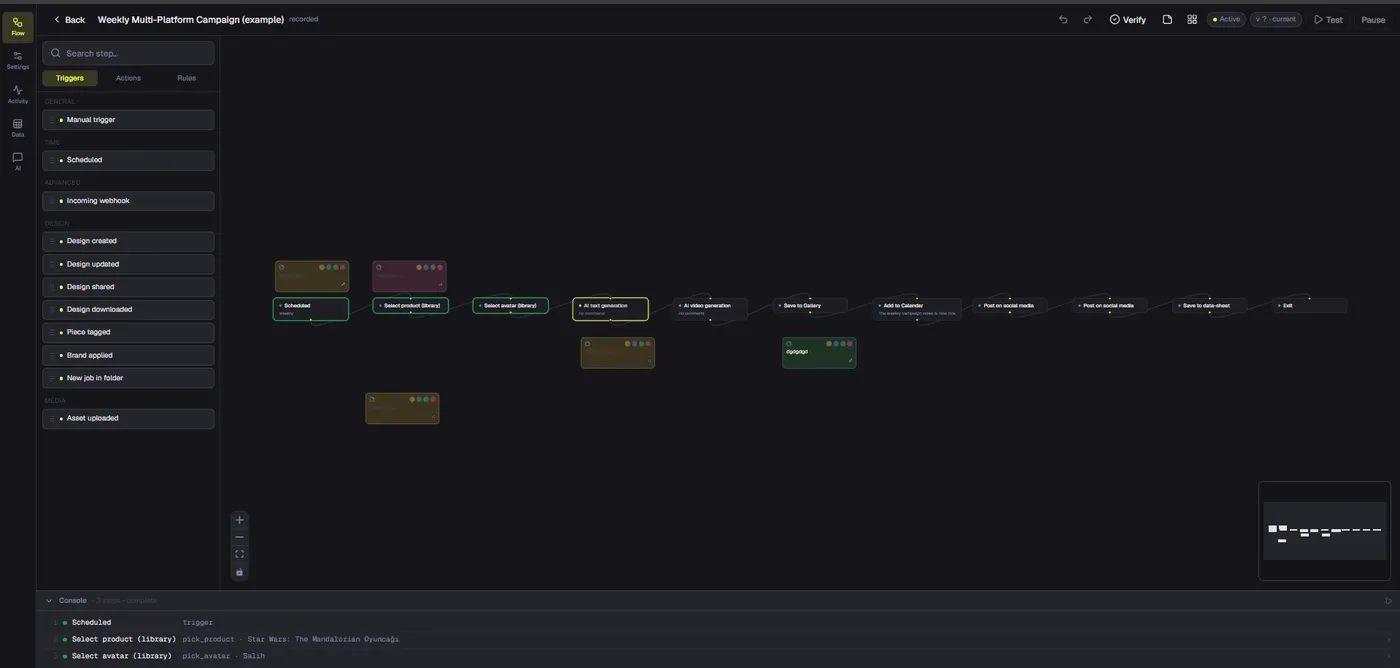
We will use Dika Studio’s video-generation and editing workflow as an example. Video mode can create short clips from prompts through connected providers; Marketing Studio offers guided promotional scenarios; the browser editor assembles approved clips on a timeline. Dika Studio is in a staged rollout, so confirm workspace access and provider availability before planning a deadline around a particular surface. The principles below also work if a team generates footage elsewhere and brings it into an edit.
Define the decision the ad should influence
An ad cannot do every job at once. It might introduce a new product, explain one feature, address a common objection, or bring back a shopper who already visited a page. Pick one. If you ask a fifteen-second ad to build awareness, demonstrate five features, announce a discount, and tell a founder story, the viewer will likely remember none of it. The narrower the job, the easier it is to choose the right scenes and judge whether the result works.
Write a one-sentence outcome: “After watching, a small-business owner understands that this tool can turn an approved product photo into a short campaign clip and knows where to see the workflow.” That sentence states audience, value, and action. It does not claim the tool guarantees sales. For a physical item, the outcome might be that a shopper understands one practical benefit and can inspect the actual product. Keep that sentence visible during production. Every scene should support it or leave the cut.
Build a brief that survives handoff
A useful brief contains the audience, problem, offer, proof, channel, format, call to action, and constraints. Proof is particularly important. A generated person smiling beside a product is not proof that the product works. A real screen recording, product close-up, genuine demonstration, or approved customer statement may be. Note which footage must be real and which may be illustrative. This prevents a creative team from accidentally asking a model to invent the very evidence the ad is supposed to communicate.
- Audience: Name a concrete segment and its level of product familiarity.
- Promise: State one benefit in words a viewer can test or understand.
- Proof: List real footage, product data, and claims approved for use.
- Placement: Pick the first platform and its orientation before generating.
- Action: Choose one destination that continues the same message.
- Limits: Record brand rules, usage rights, excluded claims, and budget.
For example, a software team could brief a vertical ad for people who struggle to make social clips from campaign assets. The promise is faster preparation of an editable first cut; the proof is a genuine screen recording of the scene list and timeline. Generated footage can provide an opening example, but it must not masquerade as a complete product demonstration. The destination page should show the same workflow, not a generic company page. That continuity makes both the creative and the measurement cleaner.
Translate the brief into a small shot plan
Text-to-video ads work best when a prompt is assigned to a specific shot. Build a sequence of four to six beats: attention, context, product action, proof, and next step. Not every beat requires AI. A headline overlay may explain context faster than a generated scene. A screen recording may prove an action better than an avatar. Decide the source of each beat before generation. Otherwise the first striking AI output can pull the entire campaign away from its original aim.
| Beat | Question for the viewer | Useful source | Failure to watch for |
|---|---|---|---|
| Opening | Why should I stop? | Short generated concept or real problem shot | Attention without relevance |
| Context | Is this for someone like me? | Simple scene or editable title | Generic stock-like stereotype |
| Action | What changes? | Real product or interface capture | Invented feature or impossible behavior |
| Proof | Why believe this? | Approved demonstration or data | Generated material presented as evidence |
| Next step | What should I do? | Editable end card | Unclear or mismatched landing page |
Mark each beat with an approximate duration and a crop-safe area. The opening may need only two seconds. The proof may deserve more time. A horizontal clip made for a website is not automatically a usable vertical social ad; important details can fall outside the crop. If the campaign requires multiple formats, either plan separate compositions or leave enough space around the subject. Test the rough sequence on a phone before spending on polished generations.
Write prompts for observable motion, not marketing adjectives
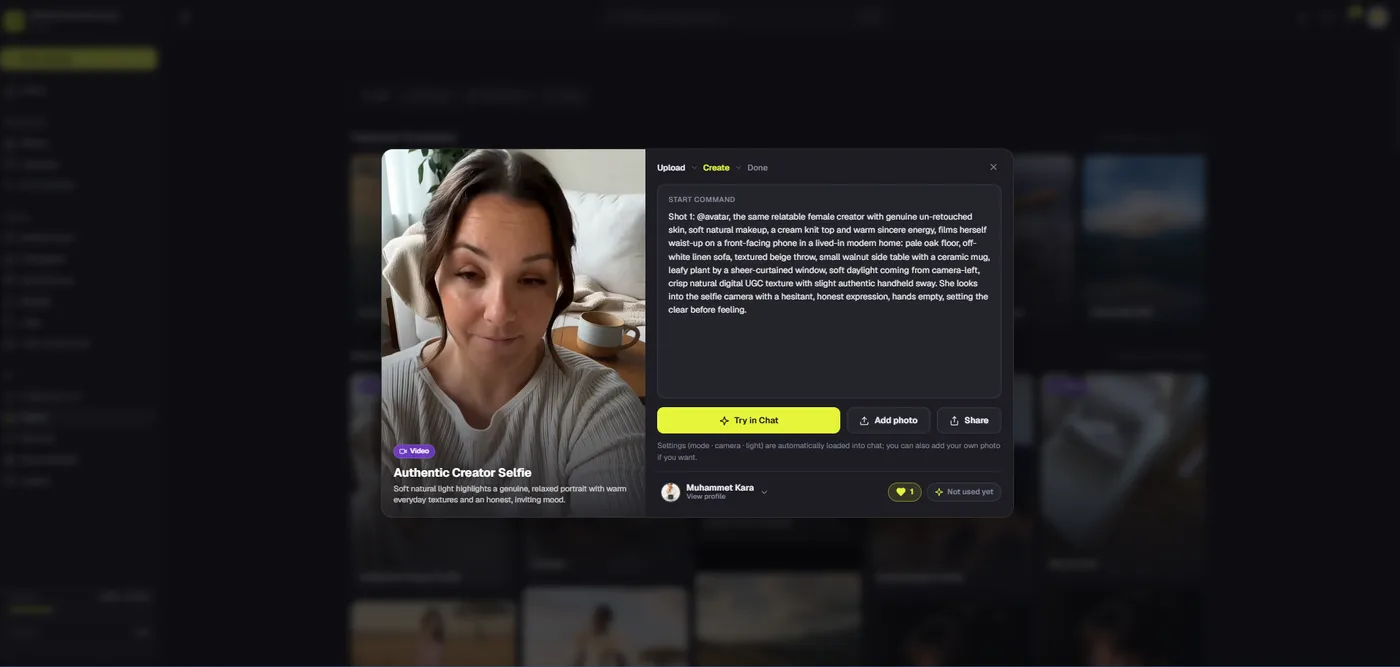
A weak prompt says, “Make a premium viral ad for my brand.” It does not specify what appears, what moves, or how the output supports the brief. A stronger prompt names the subject, setting, camera, action, duration, aspect ratio, lighting, and details that must remain unchanged. If the product must be exact, attach an approved reference where the selected provider supports one. Describe the motion modestly. More dramatic movement creates more opportunities for distorted hands, shifting labels, and inconsistent shapes.
Consider an opening shot for a reusable bottle: “A commuter places the supplied matte blue bottle beside a laptop on a train table. Camera pushes in gently. Morning light through the window. Keep bottle shape and cap color unchanged. No readable invented text.” That prompt describes a scene rather than asking the model to invent a sales claim. The next shot should show the real bottle and its closure if the ad implies leak resistance. Generated atmosphere and factual proof have different responsibilities.
Text-to-video without a reference can be useful for abstract transitions, mood, or concept exploration. It is riskier for product identity. If the model invents a feature, a brand mark, or packaging language, the clip cannot simply be accepted because it looks professional. Use generated text only when exact words do not matter. Place prices, offer terms, product names, and calls to action as editable overlays in the final edit. Those fields change often and need human approval.
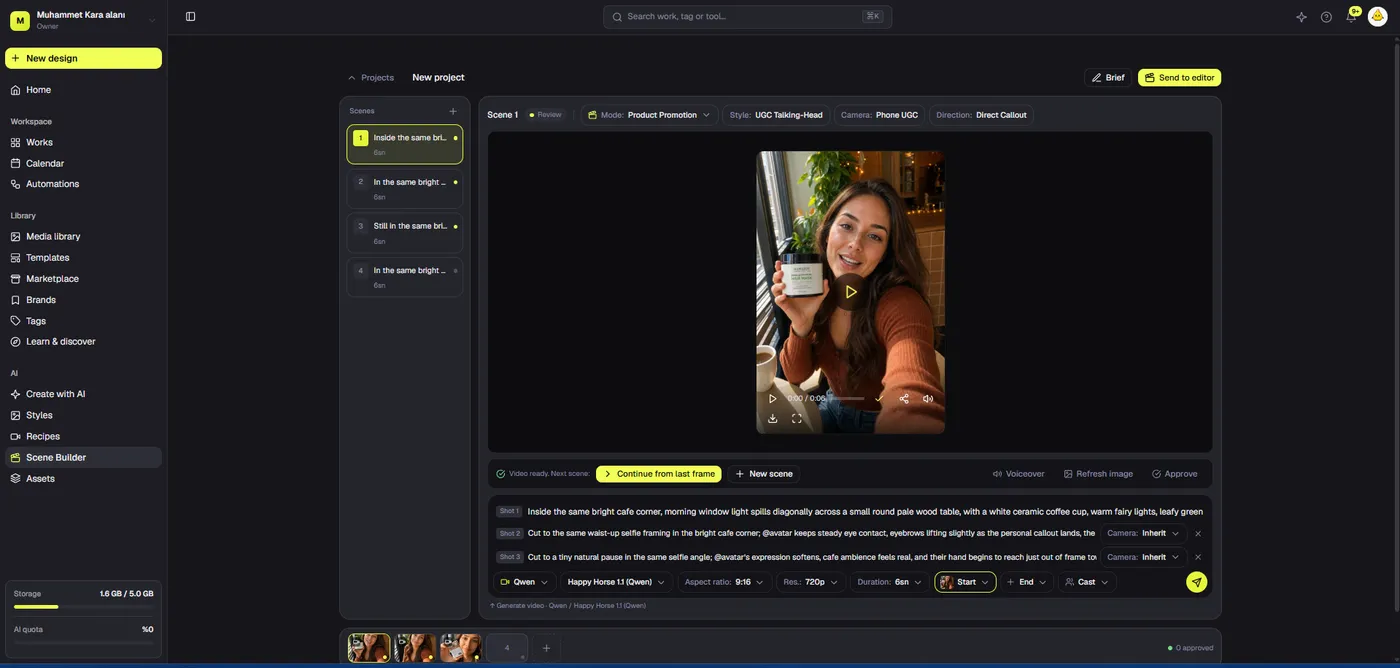
Dika’s video mode lets a team choose aspect ratio, resolution, duration, and a connected provider. The composer offers short 5- or 10-second choices; actual output length can vary by model. A start frame can guide a scene, and an end frame is available with Qwen in this workflow. Cost estimates appear for fal.ai and BytePlus models, while Qwen’s cost is checked with its provider. These controls help bound an experiment, but they do not make a generated clip approved content. Review remains a separate step.
Generate cheaply, then select deliberately
Do not begin with the longest, highest-resolution generation available. Make a short test at a lower cost to see whether the prompt produces the right subject, composition, and movement. If the result misses the brief, identify the reason before trying again. Was the product reference unclear? Was the requested action physically contradictory? Did the provider make the scene too busy for an ad? Change one variable at a time so the next take actually teaches you something.
Keep a generation log with prompt version, source references, provider, aspect ratio, duration, approximate cost, and reviewer decision. This sounds administrative, but it protects time once a campaign has several variants. Without a log, teams lose track of which clip belongs to which approved product version, and a rejected take can return by accident. Label a candidate as “illustrative,” “needs correction,” or “approved for edit.” A generated clip should never move straight from preview to paid media without an accountable review.
Watch each take at normal speed and frame by frame. Check people, hands, mouth movement, labels, product geometry, reflections, and implied actions. A person may hold a product in a way that would not be possible; a device may show a nonexistent screen. These are not cosmetic defects if the ad uses them to imply a capability. Reject misleading shots. If several candidates fail the same claim-sensitive detail, replace that part of the sequence with real footage or a static approved image.
Use cost as one selection factor, not the only one. A cheaper model may be sufficient for an atmospheric transition. A more expensive render may still fail at packaging accuracy. Match the provider to the shot’s job and stop generating when an approved clip does the job. The goal is a coherent advertisement, not the largest collection of interesting AI video outputs. Keep a fixed experimentation budget and reserve time for editing, legal review, and format adaptation.
Turn separate clips into a clear final cut
Assemble the chosen shots around the proof beat. Put the viewer’s question on one side and the verified answer on the other. Trim every clip so the action begins promptly and the result has time to register. Add voice or captions only after the visual sequence makes sense without them. If the ad needs a long voiceover to explain why a scene matters, the scene may be wrong. A useful rough cut should be understandable with sound off, because many short-form placements begin muted.
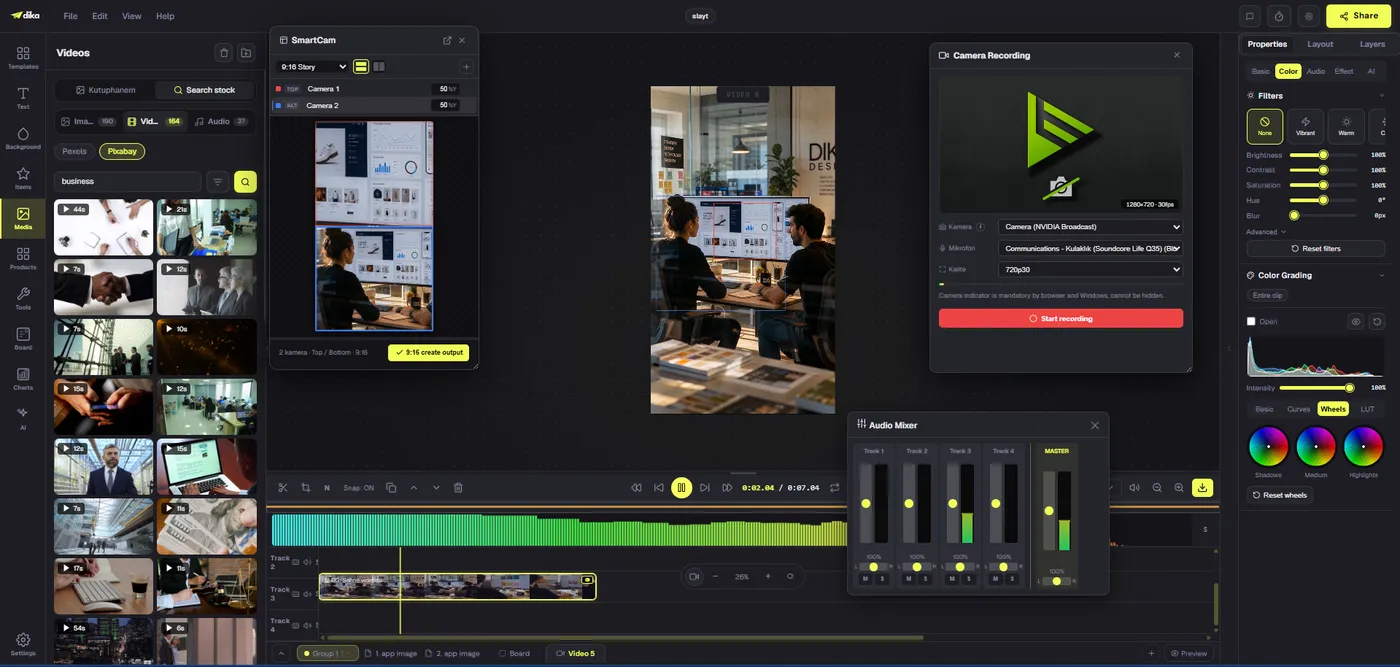
Dika’s browser editor provides a multi-track timeline for video, audio, overlays, subtitles, and transitions. Generated scenes can be combined with real captures and editable text rather than being published as untouchable outputs. Separate tracks make correction practical: a pricing line can change without regenerating the footage, and a caption can be revised without disturbing a cut. Keep the brand mark and call to action present but subordinate to the product story.
Use restrained transitions. A cut is often clearer than an elaborate effect, especially when the product action needs to be compared with a before state. If an animated transition hides a visual discontinuity, viewers may notice the inconsistency later and lose trust. Show real product details plainly. Set music under speech, not over it. Review automatically generated subtitles against the actual script, especially product names and numbers. A captioning error in an ad can change the claim.
Build versions without breaking the message
Keep a master edit, then adapt it for each placement. A vertical short may need a tighter opening and larger captions. A horizontal landing-page video can allow more detail and a slower proof moment. A square feed ad may require the product to be repositioned rather than cropped. Do not assume that changing the export dimensions creates a usable variant. Watch each version at the size and in the context where it will appear.
Maintain consistent claims across versions. If one platform requires a shorter cut, remove a secondary explanation rather than the evidence that justifies the main promise. If the proof no longer fits, narrow the claim. Keep offer dates, legal copy, and destination URLs aligned. An ad that says one thing and a landing page that says another may attract clicks while hurting conversion and trust. Version names should include channel, ratio, and revision so the team can retire outdated cuts.
Review claims, rights, and platform fit before launch
A final review should be broader than visual polish. Check that every testimonial comes from a real approved source, that any depicted person or voice has appropriate rights, and that music and reference media can be used commercially. Do not present a synthetic presenter as a spontaneous customer. If a shot is a concept, avoid copy that implies it is a real product test. Review applicable advertising and platform rules for the markets where the campaign will run; requirements can differ by location and placement.
Compare each spoken and on-screen claim with the product page and internal approval record. “Saves two hours” requires evidence and context. “Available now” requires actual availability. “Made in” and material claims must match the sold item. Generated images can make an unsupported statement look convincing, which increases the need for verification rather than reducing it. If the source brief contained a weak claim, fix the brief before the export, not after someone questions the ad.
Inspect the MP4 outside the editor. Confirm the first frame, thumbnail, cropping, subtitle legibility, audio balance, and playback on a phone. Check that the ending leaves enough time to recognise the next step. A call to action that appears for half a second may satisfy a storyboard but fail in practice. If the platform overlays its own buttons or captions, make sure those controls do not cover your critical text. Preserve a clean master file and record the approved version.
Measure one learning question after publication
View count and reach are not enough. Decide what the ad is meant to change: qualified visits, product-page engagement, trial starts, or purchases. Compare it with a reasonable control, such as a still-image creative or a previous real-footage ad with the same offer and audience. Interpret differences cautiously; channel targeting, seasonality, landing-page quality, and budget can all affect the result. A text-to-video ad is a production method, not a guarantee of performance.
Look at the points of friction. If people stop before the proof, move the proof earlier or sharpen the opening. If they watch but do not click, check whether the next action is clear. If they click but leave the landing page, compare the ad promise with the page they reached. If they add the item to cart but later ask about size or appearance, the creative may need more real product detail. Each finding should produce one testable revision, not a wholesale rewrite of the campaign.
Keep a small learning record beside the generation log: audience, placement, creative version, offer, spend, result, and what changed. That makes the next brief better. The best benefit of an AI-assisted process is not simply making more videos. It is reducing the cost of exploring a few specific creative directions while keeping a clear record of what viewers actually responded to. Speed only helps when the team can distinguish a useful experiment from another attractive distraction.
Launch checklist for text-to-video ads
- One audience, one decision, and one primary claim are explicit.
- Each scene has a job; generated footage is not used as false proof.
- Product identity and factual details match the approved record.
- Every clip has been reviewed frame by frame.
- Offer text, captions, and call to action remain editable.
- People, voices, marks, music, and references have appropriate rights.
- Each format has been viewed in its actual placement size.
- Landing-page message continues the promise made by the ad.
- Approved exports have version names and owners.
- Performance is judged against a defined outcome and control.
Text-to-video ads become useful when the prompt is one controlled production step inside a sound marketing workflow. Start with a brief, assign each shot a purpose, keep factual evidence real, and edit generated material into a story the viewer can follow. Explore Dika Studio’s creative workflow for generation and editing in one product direction. For a more detailed production method, see our AI product demo video guide; for broader brand and campaign work, visit the Dika Design home page.
Frequently asked questions
What is a text-to-video ad?
A text-to-video ad uses a written prompt to generate one or more moving scenes for an advertisement. A complete ad still needs a brief, approved claims, editing, and a relevant destination.
Can one prompt produce a finished commercial?
A prompt may create a candidate clip, but it cannot verify product facts, rights, audience fit, or campaign measurement. Build and review the final sequence separately.
When should an ad use real footage instead of generated video?
Use real footage or screen capture whenever a shot must prove product operation, physical properties, interface behavior, or a specific result.
How long should a generated ad scene be?
Keep initial tests short and assign each clip a single job. Dika Studio’s composer offers short duration choices, while actual output length depends on the connected model.
Can Dika Studio create video from text?
Yes. Video mode generates short clips from prompts through supported connected providers. Workspace access and provider configuration can vary during the staged rollout.
What should a video prompt include?
Describe subject, setting, camera movement, action, format, and details that must remain unchanged. Avoid vague requests for a viral or premium ad.
How do I reduce inconsistent product details?
Use an approved reference where supported, limit motion, inspect every frame, and switch to real footage or editable overlays when exact details matter.
Do I need a different cut for each platform?
Usually yes. Adapt timing, crop, captions, and overlays for the placement instead of merely changing export dimensions.
Can an AI presenter give a customer testimonial?
Do not imply a synthetic person is a real customer. Use only genuine approved testimony and secure likeness and voice rights for depicted people.
How should I measure a text-to-video ad?
Define a qualified outcome and compare with a suitable control. Look at landing-page behavior and conversions as well as attention metrics.